The network core: why your video call drops on 1 Gbps fibre
Video · 29:54 min · Session 1.3 · Sep 15, 2026 · In Spanish, with English subtitles · Watch on YouTube
chapters
- 0:00 Why your video call drops
- 0:34 Network Architecture I, session 1.3
- 0:46 The plan for the session
- 1:52 Reserving vs sharing
- 4:21 35 users versus 10
- 7:33 Is a TCP connection a circuit?
- 8:38 The network of networks
- 12:02 The traceroute to Australia
- 12:54 Why is there no universal peering?
- 13:43 The four delays
- 18:25 Queues, losses and throughput
- 21:55 The diagram with ACKs
- 26:38 Solving the mystery
- 28:05 Exam summary
related visualizations
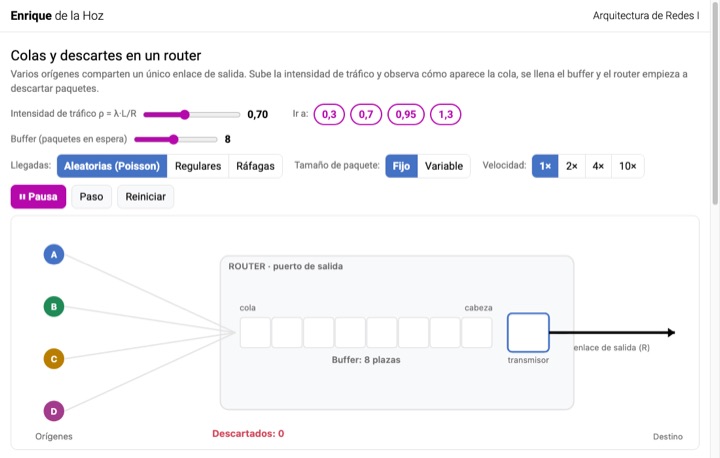
Queueing and packet drops in a router
Several sources share one outgoing link. Raise the traffic intensity ρ = λ·L/R and watch the queue grow, the buffer fill up, and the router start dropping packets.
Session 1.3Versión en español
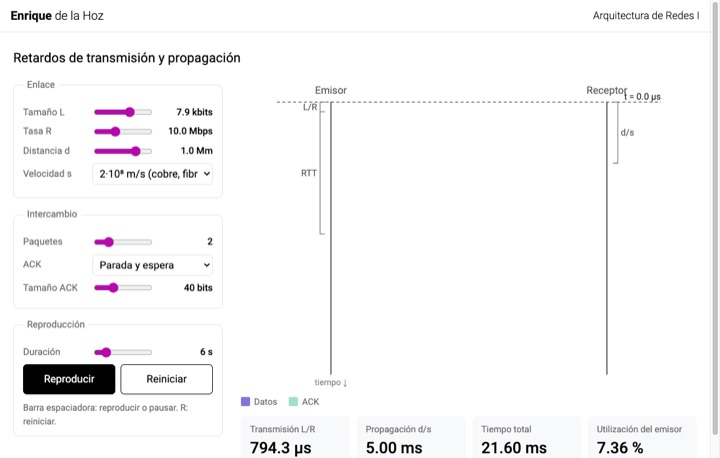
Transmission and propagation delay: space-time diagram
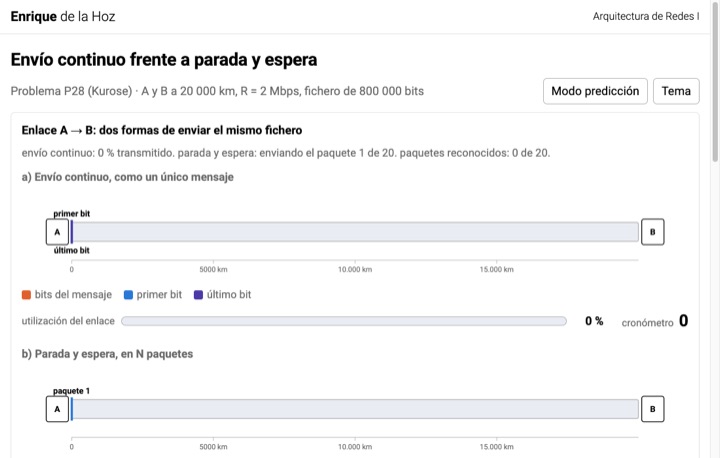
Adjust size, rate, distance and propagation speed and follow the packets between sender and receiver. Compare stop-and-wait with pipelining and the sender's utilization.
Session 1.1Versión en español
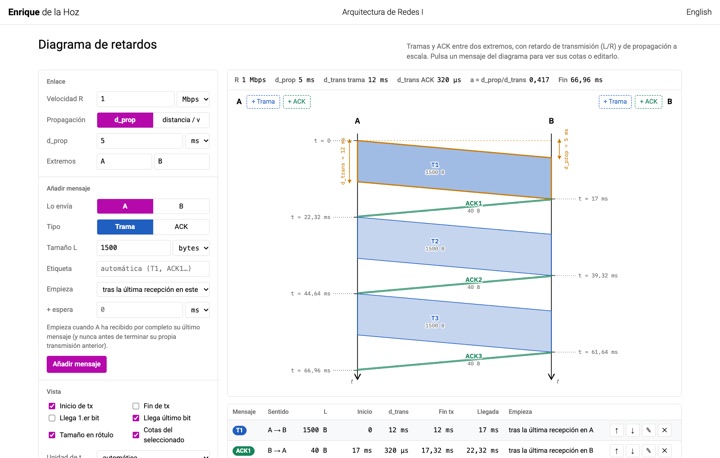
Delay diagram
Draw frames and ACKs between two ends to scale and decide when each one starts. Read the transmission and propagation delays off the dimension lines and export the diagram as SVG or PNG.
Session 1.3Versión en español
transcript
Show the full transcript, by chapter
Why your video call drops
I have 1-gigabit fibre. And yet the video call with my project group keeps dropping every five minutes. How can that be? Well, it can. And it’s not your fibre’s fault.
To understand why, we have to open up the Internet and look inside: how a link is shared among millions of people, which paths your traffic takes, who owns each of them and, above all, what actually blows up when the network gets slow. Which may not be what you think. This is Network Architecture, session 1.3: the network core.
Network Architecture I, session 1.3
By the end of the episode you’ll know exactly why your call freezes, and you’ll know it with numbers.
The plan for the session
Hi, this is the Network Architecture podcast. If you came to class, this is a recap at a different pace. If you couldn’t make it, here are the essentials of the two-hour lecture in half an hour. Keep some paper handy, because at some point I’ll ask you to draw along with me. We’re going to solve the mystery from the intro in three steps.
First, how a network is shared among millions of communications. Second, how the Internet is organised inside: who connects to whom, and who pays whom. And third, the numbers. How long does a packet take? What is that time made of?
And what actually blows up when the network gets slow? Before we start, one idea from earlier sessions that we’ll need today right to the end. In session 1.1 you computed two times. The transmission delay, which is the packet size divided by the link rate, and the propagation delay, which is the distance divided by the signal speed. If you don’t remember them, pause for a moment and look them up.
Let’s begin. Think of the Internet core as a mesh of routers joined by links.
Reserving vs sharing
Through that mesh, at the same time, must pass your video call, your classmate’s download, and the email of someone on another continent. The underlying question of these sessions: how is the capacity of those links shared among all those communications? There are two historical answers. The first is the one from the good old telephone: circuit switching. When you pick up and dial, the network finds a path to the destination and, on every link along that path, reserves a slice of the capacity for you.
That slice is yours for the whole call, whether you use it or not. In return, nobody takes it from you, the quality is constant and there is no waiting. Note the three phases: first the circuit is set up, then it is used, and when you hang up it is released. The second answer is the Internet’s: packet switching. Here nothing is reserved.
The information is chopped into packets and each packet travels on its own. When a packet reaches a router, the router receives it in full, looks at the destination address, decides which link it leaves on, and transmits it. If that link is busy with another packet, ours waits in a queue. Packets from different communications get interleaved on every link. That is sharing.
Keep two words in mind: reserve for circuits, share for packets. Now, why wasn’t the Internet built with circuits, if circuits guarantee quality? For a reason you can check in any conversation. Most of the time, one of the two speakers is silent. A telephone circuit carries silence half the time, and in a data communication it’s much worse.
You look at a web page or a social network for a minute and in that minute you send almost nothing. The reserved circuit sits empty and nobody else can use it. Let’s look at an example with real numbers. The classic link between two telephone exchanges in Europe is the E1, at 2048 kilobits per second. It is divided into 32 circuits of 64 kilobits per second, which is what a digitised voice needs.
32 calls fit. Call number 33 does not wait in a queue, nor does it go slower: it is simply rejected. That’s the “all lines are busy” tone. That is the price of reserving. When there is no resource, there is blocking.
35 users versus 10
The textbook has an example that sums all this up, and you should be able to reproduce it. We have a 1-megabit-per-second link. Each user, when active, generates 100 kilobits per second, but users are only active 10% of the time. The rest of the time they are reading, thinking or silent. With circuit switching, each user needs their own 100-kilobit-per-second reservation, so 10 fit.
10 and not one more, even if 9 of them are silent. With packet switching we don’t reserve; we admit, say, 35 users. When is there a problem? Only when more than 10 are active at once, because then they generate more than one megabit per second and the link can’t keep up. But how likely is that?
This situation is modelled with a binomial distribution: 35 users, each active with probability 0.1. The probability that more than 10 users are active at the same time is 0.0004, or, put another way, 4 in 10,000 at most. That is, 99.96% of the time the 35 users get exactly the same service they would get with a circuit, and there are more than three times as many. This is called statistical multiplexing. The sharing is not fixed in advance; it depends on how the traffic is generated, and it works precisely because some users’ silence is used by others.
Now I’ll repeat the question I asked in class: what if, instead of 35, we admit 100 users? Intuition says the probability of saturation should go up a little. However, the binomial distribution tells us otherwise: with 100 users, the probability that more than 10 are active at once is 0.42, almost half the time. The reason is simple: 100 times 0.1 is 10 active users on average, and exceeding the average happens very often. Conclusion: packet switching lets us serve many more users than circuit switching, but not infinitely many.
We have to size the network, and we’ll come back to that in part three when we talk about traffic intensity. Before closing this block, the summary you need to know. Circuits: they involve an end-to-end reservation, a low and constant delay, no queues, and guaranteed quality; in exchange, you have to account for a set-up time, wasted resources that are not being used, and blocking when there are no resources left. Packets: no reservation needed, generally more efficient use of the link, no blocking at admission, alternative paths for each packet; and in exchange we have to account for variable delay, queue management, congestion with losses and reordering, and the need to include a control header in every single packet.
Is a TCP connection a circuit?
We can ask the following question. Just before, in the previous session, we said that TCP establishes a connection before sending data. Isn’t that a circuit? The answer is no, and it’s one of the most common confusions in this topic. A TCP connection is a logical agreement between the two endpoints.
They agree, among other things, to number the data and to acknowledge it. No router along the path knows that connection exists, and nobody reserves capacity on any link. TCP packets travel like any other: sharing, waiting in queues, and sometimes getting lost. A circuit, on the other hand, is a physical reservation at every node along the path. Both things, connections and circuits, have three phases: set-up, use and release, and that’s why they look alike in form.
But one is an agreement between two programs, the connection, and the other is a resource reserved in the network. If in the exam, say in a multiple-choice test, connections and circuits show up, that’s a likely source of confusion. Let’s change scale.
The network of networks
So far we’ve talked about one link and a handful of routers. But the Internet has millions of access networks: your home, your mobile operator, the university, every company. How do they all connect to each other? Connecting every network to every other one is impossible. With a million networks that would be on the order of 500 billion links.
Nor is there a single global provider everyone connects to, because nobody owns the Internet or governs it. What exists is a hierarchy and a set of commercial agreements between these independent networks. Let’s walk up this hierarchy from the bottom to the top. At the base are the access ISPs, the ones that give you connectivity at home, on your phone or at the university. Each access ISP contracts a larger ISP, regional or national, to carry its traffic to the rest of the world.
And these regional ISPs in turn contract the tier-1 ISPs. These are about a dozen networks of global reach, with names like Lumen, Cogent, NTT or Arelion, which pay nobody, because they reach everywhere and connect to each other as equals. Here come the four terms you have to master. First, the customer-provider relationship. The customer ISP pays the provider for transit, that is, for carrying its traffic to and from the whole Internet.
You pay your operator, and your operator will pay a tier-1 provider. Second, the point of presence, the PoP. A PoP is a group of routers belonging to the provider ISP, located in a specific place, for example a building in Madrid, to which the customer ISP connects its own routers, usually through a leased line or its own fibre. The PoP is where the customer-provider connection happens. It is not a private content network, it is not free, and it doesn’t replace anyone.
It is the entry door into the provider’s network. Third, multi-homing. An ISP, or a large company, connects to two or more providers. If one fails, it stays connected, and it also lets it negotiate better prices. Finally, peering.
We talk about peering when two ISPs at the same level connect directly and exchange their customers’ traffic without paying each other. Why? Because both save money: the traffic between a Movistar customer and a Digi customer, to name two, has no reason to go up to a tier 1 and pay transit twice. When peering is done at scale, in a building with a switch that hundreds of networks connect to, we are talking about an Internet exchange point, or IXP. In Spain, for example, we have ESpanix, with more than a thousand connected networks.
Now, the ingredient that the classic diagram lacks and that today is the most important one. Content provider networks. Google, Meta, Netflix, Amazon or Microsoft operate private global networks linking their data centres, and they don’t connect to the Internet from the top, paying a tier 1. They connect from the bottom. They peer directly with the access ISPs and at the IXPs, and they also install servers inside the operators’ networks.
When you watch a series at home, the video almost certainly hasn’t gone up to any tier 1. It went from Netflix’s network to your operator in one hop, or from a Netflix machine that is physically inside your operator’s network.
The traceroute to Australia
They do it for two reasons: they don’t pay transit, and it lets them control the delay all the way to your home. And finally, back to the traceroute we ran in the first session of the course, the one that went from the university to a server in Australia. The first three hops were routers of UAH, our access network. Hops 4 and 5 were RedIRIS, the Spanish academic network, our Internet access provider. Hops 7 to 10 were GÉANT, the European academic network.
Then we saw a hop where the time jumped from 28 to 195 milliseconds. That corresponds to a submarine cable to Australia. And the last hops, already inside AARNet, the Australian academic network, take us to the server. Five networks, five owners, and none of them is the Internet. The Internet is those five having agreed to pass each other’s packets.
Why is there no universal peering?
We can ask ourselves the following question: if nobody pays in peering, why doesn’t everyone just peer with everyone and put an end to transit? The reason is that peering only pays off when both sides gain something similar. A small ISP that wants to peer with a huge one is in practice asking it to carry traffic for free to places the small one can’t reach. The big one will say no, since it would be losing business: it would lose the chance to sell transit to the small ISP. Peering, in practice, only happens between networks of similar size, or when the big one has its own interest, for example with content providers that want to be close to the users.
It is a commercial decision, not a technical one. And now, finally, the piece we were missing to solve the video-call mystery. We begin the second part of the session. Well, it’s the third, but it’s the second one where numbers show up. From here on, everything is calculations.
The four delays
We define the end-to-end delay as the time from when the source starts transmitting a packet until the destination receives its last bit. At each node along the path, this time is made of four pieces. First, the processing delay. The router looks at the header, checks there are no errors, and decides which link the packet leaves on. We’re talking microseconds.
In the problems, we will almost always neglect this delay. Second, the queueing delay. If the outgoing link is busy, the packet waits. This is the only one of the four that cannot be computed with a fixed formula, because it depends on how many packets arrived before. It is statistical in nature, and it’s the one that makes the network feel jerky or laggy.
Three, the transmission delay. It’s the time the router takes to put all the bits of the packet onto the wire: the packet length divided by the link rate. L divided by R. A 1500-byte packet, which is 12,000 bits, on a 10-megabit-per-second link takes 1.2 milliseconds to transmit. And fourth, the propagation delay.
It’s the time the signal takes to travel along the link. The distance, the length of the link, divided by the signal speed, which in fibre and copper is about 200,000 kilometres per second, roughly two thirds of the speed of light in a vacuum. A thousand kilometres of fibre is about 4 or 5 milliseconds, depending on the value we give you for the propagation speed. Note that transmission and propagation have nothing to do with each other. Transmission depends on the packet size and the link rate, while propagation depends only on the distance.
A 100-gigabit-per-second link to Australia has a tiny transmission delay and a huge propagation delay. Those were the 170 milliseconds in the traceroute we saw. To make it stick, the textbook’s caravan analogy. A caravan of 10 cars is a packet. Each car is a bit.
A toll booth that takes 12 seconds to serve each car is the transmitter. The whole caravan would take two minutes to get through. Between that toll booth and the next there are 100 kilometres, and the cars drive at 100 kilometres per hour. So we’d have one hour of propagation. The total delay to the second toll booth would be 62 minutes.
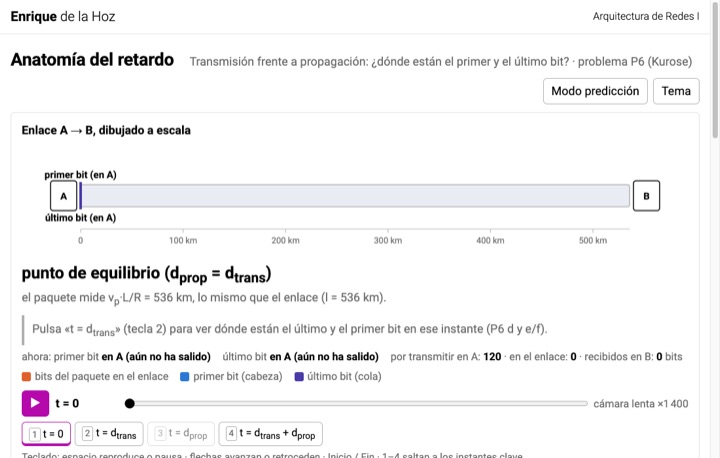
And now, a version with numbers closer to what you might find in an exam. Suppose the cars drive at 1000 kilometres per hour and the toll booth takes one minute per car. The first car reaches the second toll booth after seven minutes: one at the booth and six on the road. At that moment, three cars still haven’t left the first booth. In other words, the first bit of the packet has reached the destination before the source has finished transmitting the last one.
This happens when the transmission delay is greater than the propagation delay, which is the case with short links or large packets. Write it down, because it’s a question that has appeared in some exams. One idea is missing that links the first part with this one: store-and-forward. A router doesn’t start forwarding a packet until it has received it in full. This means that at every hop we have to account for a full transmission delay.
If a path has two identical links of 1000 kilometres at 10 megabits per second and we send a 1500-byte packet, the total delay is not 1.2 plus 4; it’s two times 1.2 plus two times 4. That gives a total of 10.4 milliseconds: one transmission delay and one propagation delay per hop. And if we send several packets back to back, is there a general formula for it? With N links and P packets, the delay is N plus P minus 1, times the transmission delay, plus N times the propagation delay. Why?
Because for the first packet we have to account for all the hops, while each following packet only adds one transmission delay, since it follows in line right behind the previous one. Check that with a single link it comes out as P times the transmission delay plus one propagation delay, which is the formula we’ve already used in the course. Let’s go back to the queueing delay, the one we said has no formula.
Queues, losses and throughput
Even though we can’t compute it exactly, we can tell intuitively when it’s going to be large. Let a be the number of packets per second arriving at the link, L the size of each packet in bits, and R the link rate. The product L times a is the bits per second arriving, and R is the bits per second the link can handle. The ratio, L times a divided by R, is called the traffic intensity, and it’s the most useful number in this part. If this intensity is greater than one, more bits arrive than leave.
The queue grows without bound, or rather, it grows until it overflows and packets start getting lost. No link can run like that for long. If the intensity is less than or equal to one, it depends on how the packets arrive. If they arrived one at a time, perfectly spaced, there would never be a queue. But in the real world, traffic arrives in bursts, and with bursts there is a queue, even if the average is low.
What matters is the shape of the curve. The average queueing delay is small at low intensities, and it shoots up when the intensity gets close to one. It doesn’t grow linearly; it grows faster and faster. That’s why operators size their links to run at around 50 or 60% load, not 99%. A quick example.
Suppose a 10 Mbps link and 1500-byte packets, that is, 12,000 bits. If 500 packets per second arrive, the intensity is 12,000 times 500 over 10 million: 0.6. Fine. However, if 900 per second arrive, we get 1.08. So, an infinite queue and guaranteed losses.
When the queue fills up, what happens to the packets that reach the router? They are dropped, full stop. The buffer, that is, the space the router has to store these packets, has a finite size. Whether the packet gets recovered or not is no longer the router’s business. It may be retransmitted by the previous node, it may be retransmitted by the source if a reliable protocol like TCP is used, or nobody may retransmit it at all.
That’s what happens with live video: when a packet arrives late it’s no longer useful to us, so there’s no point in retransmitting it. Last quantity of the session: throughput, or transfer rate. It’s simple: useful bits transferred, divided by the time it took. In the layers session we defined it per layer, as the SDU divided by its time. Here it’s the same idea applied to the whole path.
The only thing you need to understand is the bottleneck. If a file goes from the server to the client through a 2-megabit-per-second link and then through another one at 1 megabit per second, the throughput is 1 megabit per second, the minimum of the two. The router in the middle stores the excess, but it can’t speed anything up. A file of 32 megabits takes 32 seconds, not 16, and not 48 either, because the two links work at the same time, not one after the other. And if a core link is shared by N connections at once, each one sees at most R divided by N.
Today, with an over-provisioned core, the bottleneck is usually in the access. That is, in your link, not in the link in the middle.
The diagram with ACKs
Let’s finish with the tool we’ll use in the small-group sessions and in problem solving. The timing diagram. Grab a sheet of paper and draw two horizontal lines: the client at the top and the server at the bottom. Time runs from left to right. In the lab or in the small group we’ll sometimes draw it with two parallel vertical lines.
Here we’ll choose two horizontal lines to make it visually easier to draw. Let’s look at the data. 500 kilometres; propagation speed, 2.5 times 10 to the 8. We have a 5-megabit-per-second link and we want to send two 1000-byte frames back to back. In addition, acknowledgements of 60 bytes will be sent.
We start by computing the propagation delay. The propagation delay is the slope of everything we’re going to draw. 500,000 over 2.5 times 10 to the 8: that gives 2 milliseconds. On to transmission. We have 8000 bits over 5 million: that gives us 1.6 milliseconds.
And finally, the transmission of the acknowledgement, the ACK: 480 bits over 5 million, which gives us 0.096, a very small delay but greater than 0. Now let’s draw frame 1. It’s a parallelogram that leaves the top at instant 0, finishes leaving at 1.6, and slopes down over 2 milliseconds, arriving between instants 2 and 3.6. Frame 2 is transmitted immediately after frame 1: it leaves at instant 1.6, finishes leaving at instant 3.2, and arrives from instant 3.6 to instant 5.2. And what happens with the acknowledgement of the first frame?
The acknowledgement of the first frame is sent by the receiver from instant 3.6, as soon as the server has the last bit. It takes 0.096 to send and 2 milliseconds to reach the sender, arriving at the top at 5.7. Same for the second one, from 5.2, so it would arrive at 7.3 milliseconds. That would be the delay the problem asks for. With this value we can compute the application throughput: 16,000 useful bits over 7.3 milliseconds, about 2.2 megabits per second on a 5-megabit-per-second link.
We lose more than half just to propagation and waiting for the ACK. Now the variant that also gets asked: stop-and-wait. In this variant the client won’t send frame 2 until it has received the ACK, the acknowledgement of frame 1. Let’s compute: 1.6 plus 2 plus 0.096 plus 2, a total of 5.7 milliseconds for each of the two frames, 11.4 milliseconds in total. With this delay, the throughput drops to 1.4 megabits per second.
This means the link sits idle almost three quarters of the time waiting for acknowledgements. This is the cost of using stop-and-wait, and it’s a problem that gets worse with distance. In topic 3 we’ll see how we can improve this performance by using windows, which allow several frames to be sent before waiting. If you made the drawing, compare it with the corresponding lecture slide. There are three typical mistakes.
The first: drawing the frame as a single line, forgetting the transmission delay. The second: starting the second frame when the first one arrives, which confuses back-to-back sending with stop-and-wait. And the third: forgetting that the ACK has a transmission delay too, however small. Back to your video call. You have a gigabit.
How much does a video call need? 2 or 3 megabits per second.
Solving the mystery
You have 300 times more throughput than you need. So what causes the failure? It’s the queueing delay that causes the failure. On some link along the path, which almost certainly is not your access link, the traffic intensity gets close to one for a few seconds. It could be your home Wi-Fi, which is just one more shared link, but it could also be your operator’s link to an exchange point at peak time.
It could also be other shared media, for example in a student flat or at the university, when many users share the same network. When the intensity gets close to one, the curve we saw shoots up. Some packets arrive late and others don’t arrive at all. They’re lost because they can’t be stored in a queue of finite size. And the video call, as we’ve seen, doesn’t wait for a late packet.
The packet doesn’t arrive, and we see it as a video that freezes. Notice that none of this is fixed by your gigabit per second. The bottleneck rules, and the bottleneck may be somewhere else. And none of this would happen with a reserved circuit, but then only 10 users would fit, not 35. That’s the compromise the Internet settled on.
Sharing instead of reserving.
Exam summary
I’ll try to summarise this session in six sentences. One: circuit switching, things to keep in mind. End-to-end reservation, constant delay, idle resources and blocking. Two: packet switching. No reservation, store-and-forward operation, statistical multiplexing, variable delay and losses.
But many more users: 35 versus 10 in our example. Three: the Internet is a network of networks. Access networks, regional networks, tier-1 networks. We’ve talked about points of presence, we’ve talked about multi-homing, peering and exchange points. And finally, we’ve talked about content networks that connect directly to the access.
Four: the end-to-end delay is the sum, at each node, of the processing, queueing, transmission and propagation delays. Transmission is L over R; propagation is distance over speed. And because of store-and-forward operation, we have to account for an additional transmission delay at every hop. Five: the traffic intensity, L times a divided by R, has to be clearly less than 1. As we approach 1, the queueing delay shoots up and the finite queue forces packets to be dropped.
Six: the end-to-end throughput is determined by the link that acts as the bottleneck, and acknowledgements also reduce the effective throughput. Other things worth reviewing: go over the concept of segmentation and make sure you understand the timing diagram. See you in the next session.